

Streamline Your Dev Workflow with Azure AI CLI and AI Agents: Boost Productivity and Cut Costs
Why You Should Use Azure AI CLI: Streamlining Your Dev Workflow
As a developer, you're always looking for ways to optimize your workflow, reduce costs, and increase productivity. That's where the Azure AI CLI comes in – a powerful tool that enables you to seamlessly integrate Azure AI services into your development process.
In this post, we'll explore the benefits of using the Azure AI CLI and walk you through a simple project setup for Semantic Kernel and Agents.
What is Azure AI CLI?
The Azure AI CLI is a cross-platform command-line tool that allows you to connect and use Azure AI services without writing code. With just a few commands, you can access a wide range of AI capabilities, including natural language processing (NLP), computer vision, and more.
REPO: https://github.com/Azure/azure-ai-cli
Advantages of Using Azure AI CLI
Streamlined Workflow: The Azure AI CLI simplifies your development workflow by providing a single interface to all Azure AI services. No more switching between different tools or services – just a few commands to get you started.
Increased Productivity: With the Azure AI CLI, you can automate repetitive tasks and focus on higher-level creative work. This means you'll be able to deliver projects faster and with greater accuracy.
Cost-Effective: The Azure AI CLI allows you to pay only for what you use, reducing costs and minimizing waste. Plus, you can scale up or down as needed, without worrying about upfront costs.
Access to Advanced AI Capabilities: The Azure AI CLI gives you access to a wide range of advanced AI capabilities, including NLP, computer vision, and more. This means you can create more sophisticated projects and applications that truly impress.
Getting Started with the Azure AI CLI
Ready to start using the Azure AI CLI? Here's a simple project setup for Semantic Kernel and Agents:
    # 1. install dotnet core
    # https://dotnet.microsoft.com/en-us/download

    # 2. create manifest file for the project
    dotnet new tool-manifest

    # 3. install azure ai cli
    dotnet tool install Azure.AI.CLI --prerelease

    # 4. init the tooling, this step will cache credentials locally
    dotnet ai init

    # 5. list all templates available
    dotnet ai dev new list

    # 6. create this template
    dotnet ai dev new sk-chat-with-agents

    # 7. run this template with all of the env vars loaded, thanks to azure ai cli
    dotnet ai dev shell --run "dotnet run"
By following these steps, you'll be able to set up a simple project for Semantic Kernel and Agents using the Azure AI CLI.
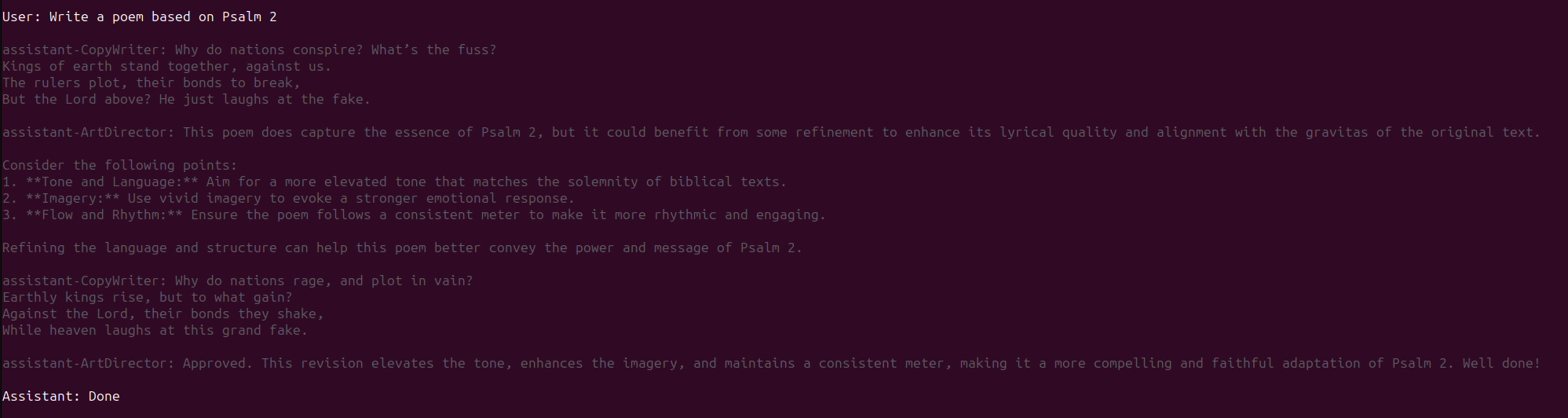
The following is the SK Agents at work:
Conclusion
The Azure AI CLI is a powerful tool that can help streamline your development workflow, increase productivity, and reduce costs. With its advanced AI capabilities and simplified interface, it's an essential tool for any developer looking to take their projects to the next level.
In this post, we've explored the benefits of using the Azure AI CLI and walked you through a simple project setup for Semantic Kernel and Agents. Whether you're just starting out or looking to expand your skills, the Azure AI CLI is an excellent choice for anyone interested in developing with AI.
Completed code can be found at: https://github.com/kdcllc/generative-ai
About the author
A highly skilled Cloud Solutions Architect with 20+ years of experience in software application development across diverse industries. Offering expertise in Cloud Computing and Artificial Intelligence. Passionate about designing and implementing innovative cloud-based solutions, migrating applications to the cloud, and integrating third-party platforms. Dedicated to collaborating with other developers and contributing to open-source projects to enhance software application functionality and performance
Comments
Join the discussionNo comments yet. Be the first to comment.


