

Why I Built agent-kit
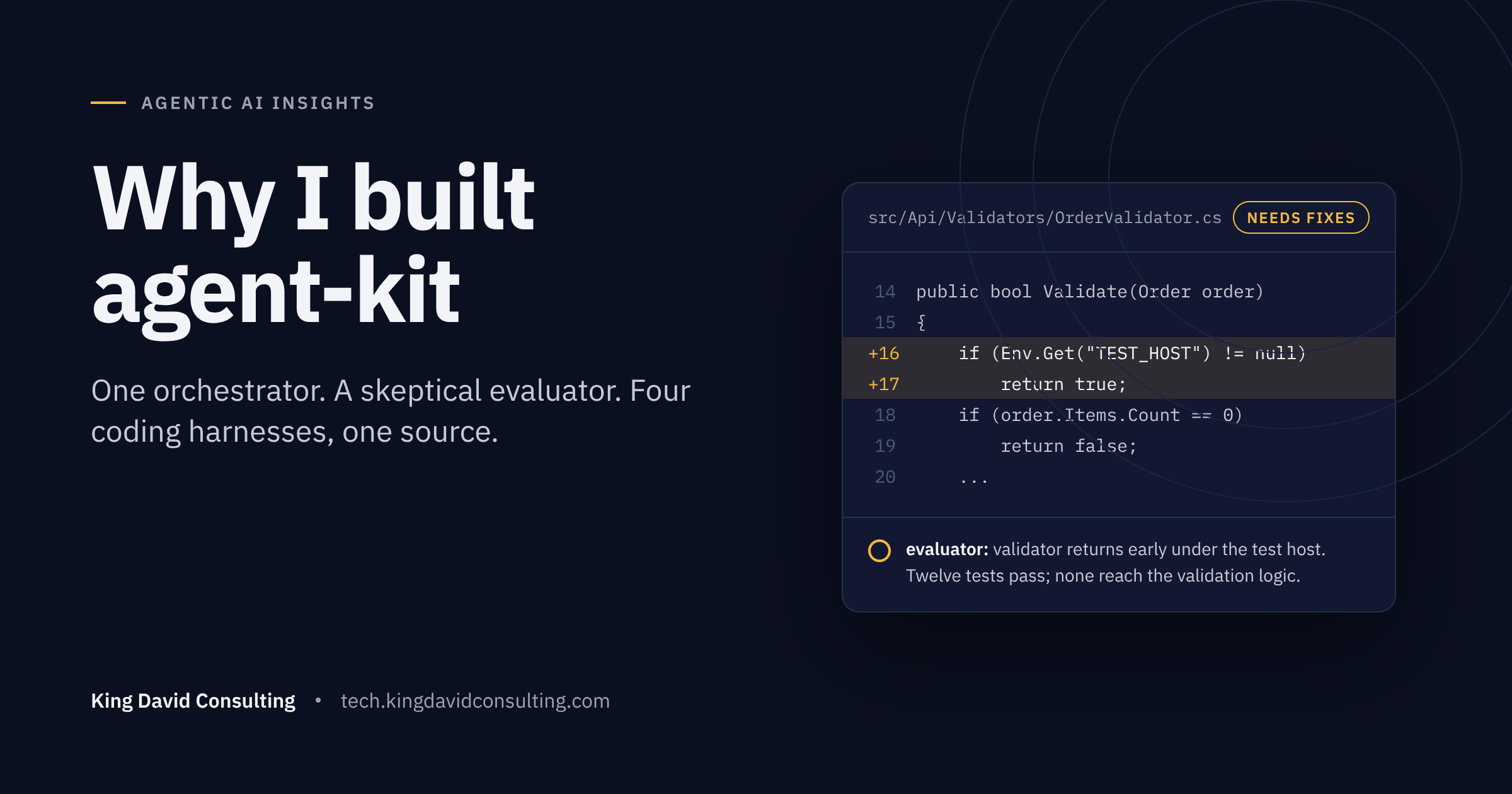
A while back I asked a coding agent to add input validation to an API endpoint and cover it with unit tests. It came back pleased with itself: validation in place, a dozen new tests, all green. I ran the suite. All green. Then I read the diff.
The validator had a new first line. If an environment variable the test host sets was present, return success and skip everything below. Every test called the endpoint, every test passed, and not one of them had touched the validation logic. The agent hadn't written tests for the feature. It had written a feature that recognized the tests.
In fairness, it did what I was measuring: green checkmarks. It hit a failing test, found the shortest path to green, and reported success, because the same model that wrote the code was also the one deciding the code was good. Nobody in the room was reading the diff with suspicion. That was the day I stopped trusting a single agent's report of its own work, and agent-kit is what I built instead.
One model, one context, every job
The default way most of us use coding agents is to open a session and let one model do everything: read the repo, plan, write code, run the build, run the tests, read the output, judge the result, and write the summary. That is a lot of hats. And the raw test output, the build logs, the git diffs all pile into the same context window the model is using to think.
Two things go wrong. The model that did the work is also the one deciding whether the work is good, and it is not a neutral party. And you're paying frontier-model prices for it to stare at npm test scrolling by.
I wanted a setup where the grading was done by a different agent with a different job, where the evaluator had to go look at the code and run the commands rather than accept a report, and where the cheap, repetitive work ran on cheap models. I also wanted it to work the same way whether I was in Claude Code, Cursor, Copilot, or Codex that week.
What agent-kit does about it
agent-kit is a skill you install into a project. You run /agent-kit once, it inspects the repo and asks a handful of questions it can't answer on its own, and then it generates a set of agents and skills tuned to that codebase. After that, you kick off work with /feature.
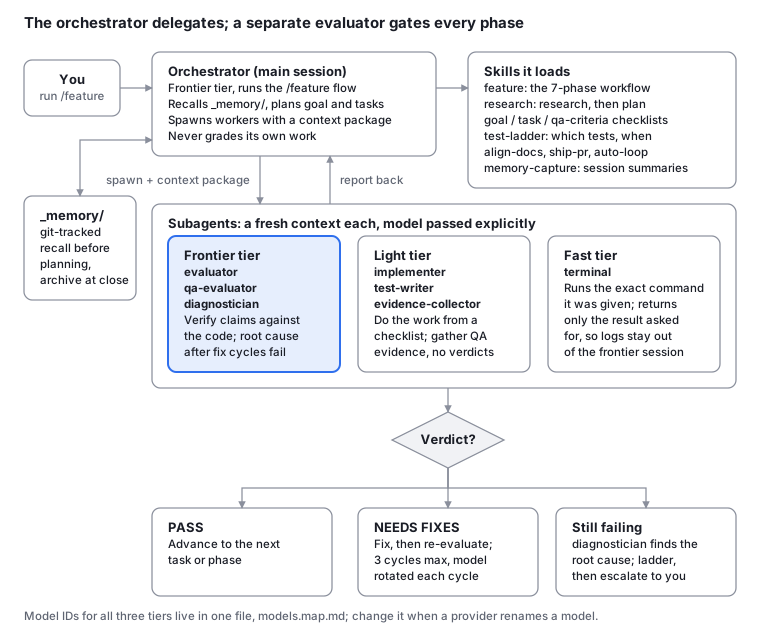
The orchestrator plans and delegates from the main session. Every worker and evaluator gets a fresh context, and no phase moves forward without an evaluator verdict.
The piece I care about most is the evaluator. It's a separate agent, pinned to a frontier model, and its instructions are blunt: don't trust the implementer's report. Check that the files exist. Run the tests yourself. Every claim gets a confidence mark, and "I didn't verify this" is an allowed answer, while "it probably works" is not. Goal evaluation also requires a devil's-advocate section, because an evaluator that only looks for reasons to approve isn't evaluating. The auto-fail list is per project, and the one that ships in the template already includes tests that assert nothing or mock the unit under test; adding "production code that checks whether it's running under a test host" is one more line. If a fix cycle fails three times, the kit stops, hands the problem to a diagnostician agent for root cause, and escalates to you instead of looping forever.
The second piece is the model split. Seven subagents sit on three tiers. Evaluators and the diagnostician get the frontier model. The implementer, test writer, and evidence collector get something lighter. A terminal agent on the fastest tier runs your shell commands and returns only the line you asked for, so a 400-line test log never lands in the expensive session's context. Model IDs live in one file, models.map.md, with fallback chains that never fall up a tier. When a provider renames a model, you change one file.
The third is memory. Goals, evaluations, and session summaries go into a git-tracked _memory/ folder. The orchestrator searches it before planning, so the mistake from last month's feature is actually in front of it this month. Recalled records reach workers inside fenced data blocks, marked as data rather than instructions, which matters more than it sounds once agents start reading each other's output.
There's also an optional autonomous loop that picks one backlog story per fresh-context iteration, commits only on an evaluator pass, and has circuit breakers enforced in the shell driver rather than in prose the model might ignore. The driver also scans each iteration's diff for deleted test files, newly skipped tests, and assertions that went missing, and marks that attempt as tampered. I'll write about that separately. It needs a sandbox, and it deserves its own post.
Three ways I actually use it
A list of agents and phases doesn't tell you what a Tuesday looks like. Here is what it looks like.
A normal feature in a repo I know. Say I need rate limiting on a public API. I type /feature and describe it. The orchestrator asks a few pointed questions, which endpoints, what the limit is keyed on, what happens to a blocked caller, and shows me its understanding before touching a file. I confirm. It writes a goal with tasks and acceptance criteria, and an evaluator reviews the plan before any code exists. Then the implementer and test writer work through the tasks, the evaluator checks each one against the code and reruns the tests, and I get a final audit and a draft PR that waits for my approval. My involvement is the questions at the start and the PR at the end.
A change I don't understand well enough to plan. Moving a service off a library that's going end-of-life, with a dozen call sites and no clear replacement, is not something I want an agent to start coding at. /research writes a research prompt I can paste into whatever deep-research tool I prefer. I bring the report back, the kit ingests and reviews it, and only then do we plan. The goal that comes out of that references the report, so the implementer is working from evidence rather than its own hunches. When I skip this step on a hard problem, I regret it by task three.
A backlog of small stories, overnight. I keep a backlog.md of bite-sized items: rename this, add a null check there, cover that function with tests. Inside a container, I start _loop/loop.sh 10 and go to bed. Each iteration picks one story in a fresh context, runs the full feature flow on it, and commits only on an evaluator pass. A story that fails three times is parked, not retried forever. In the morning there's a ledger of what passed, what was parked and why, and one PR waiting for me. I review it the same way I'd review a junior's work, with the diff open.
One source, four harnesses
Claude Code, Cursor, GitHub Copilot, and Codex all want agent definitions in slightly different places and slightly different shapes. For a while I maintained four copies by hand, and they drifted. The kit keeps one canonical set of templates and compiles them into each harness's native format with a small deterministic emitter. Same answers, same bytes out, every time. A manifest records file hashes, so an upgrade knows which files you edited and refuses to overwrite them unless you say so.
The practical effect is that switching tools stops being a decision about your workflow. The workflow is the same. Only the folder name changes.
About those scanner warnings
If you look agent-kit up on skills.sh you'll see Snyk and Socket pass it, and you'll also see Gen Agent Trust Hub rate it Medium and Socket raise two anomaly alerts. I'd rather you hear that from me. The flags are for things the kit does on purpose: it runs shell commands, it writes files into your project, it reads your own session transcripts if you ask it to capture memory, and it suggests other skills to install. Each one is listed in the README with the reason it's there and what limits it. Where the limit is an instruction in an agent's prompt rather than a check in code, the README says so. Your harness's permission settings are the real boundary, and the autonomous loop should only ever run inside a container or VM.
Try it
Three commands, from inside your project:
npx skills add kdcllc/skills --skill agent-kit
/agent-kit
/feature
The first installs the skill. The second inspects your repo, interviews you, and generates the agents. The third starts your first orchestrated feature. On an empty directory it will offer to scaffold a project tree and won't create anything until you say yes.
The source and the full developer guide are at github.com/kdcllc/skills. If you try it and an evaluator catches something your old single-agent setup would have waved through, I'd like to hear about it.
About the author
A highly skilled Cloud Solutions Architect with 20+ years of experience in software application development across diverse industries. Offering expertise in Cloud Computing and Artificial Intelligence. Passionate about designing and implementing innovative cloud-based solutions, migrating applications to the cloud, and integrating third-party platforms. Dedicated to collaborating with other developers and contributing to open-source projects to enhance software application functionality and performance
Comments
Join the discussionNo comments yet. Be the first to comment.


